SEPTEMBER /2025
SEPTEMBER /2025
WhatsApp Schedule Send
WhatsApp Schedule Send
WhatsApp Schedule Send
WhatsApp Schedule Send
WhatsApp Schedule Send
WhatsApp Schedule Send
WhatsApp Schedule Send
CASE STUDY
CASE STUDY
CASE STUDY
This project explores a visual approach to introducing WhatsApp’s “Scheduled Send” feature, allowing users to plan messages in advance. It focuses on seamless integration while maintaining familiar interaction patterns.
This project explores a visual approach to introducing WhatsApp’s “Scheduled Send” feature, allowing users to plan messages in advance. It focuses on seamless integration while maintaining familiar interaction patterns.
Project Overview
Project Overview
Project Overview
Project Overview
Some messages matter more because of when they’re sent. Think about a birthday wish at midnight or a follow-up message to client . You set a reminder in your calendar and end up forgetting. Exhausting Right?
Some messages matter more because of when they’re sent. Think about a birthday wish at midnight or a follow-up message to client . You set a reminder in your calendar and end up forgetting. Exhausting Right?
In this project, I explore how a “Scheduled Send” feature can be introduced in WhatsApp, allowing users to plan messages ahead of time instead of relying on memory. Since WhatsApp is used for a wide range of everyday communication, the goal was to design this feature in a way that feels simple, intuitive, and naturally fits into the existing messaging experience.
In this project, I explore how a “Scheduled Send” feature can be introduced in WhatsApp, allowing users to plan messages ahead of time instead of relying on memory. Since WhatsApp is used for a wide range of everyday communication, the goal was to design this feature in a way that feels simple, intuitive, and naturally fits into the existing messaging experience.

In this project, I explore how a “Scheduled Send” feature can be introduced in WhatsApp, allowing users to plan messages ahead of time instead of relying on memory. Since WhatsApp is used for a wide range of everyday communication, the goal was to design this feature in a way that feels simple, intuitive, and naturally fits into the existing messaging experience.
THE PROBLEM

/ 01
The Delayed message
A delayed message often miss the moment they matter most.

/ 02
Time zone difference
Messages sent across time zones often reach at the wrong moment.

/ 03
Forgotten
Follow-ups
Important follow-ups get missed when users rely on memory.
/ 01
The Delayed message
A delayed message often miss the moment they matter most.
/ 02
Time zone difference
Messages sent across time zones often reach at the wrong moment.
/ 03
Forgotten
Follow-ups
Important follow-ups get missed when users rely on memory.
/ 01
The Delayed message
A delayed message often miss the moment they matter most.
/ 02
Time zone difference
Messages sent across time zones often reach at the wrong moment.
/ 03
Forgotten Follow-ups
Important follow-ups get missed when users rely on memory.
/ 01
The Delayed message
A delayed message often miss the moment they matter most.
/ 02
Time zone difference
Messages sent across time zones often reach at the wrong moment.
/ 03
Forgotten Follow-ups
Important follow-ups get missed when users rely on memory.
GOAL

Design a simple and intuitive way to introduce the “Scheduled Send” feature in WhatsApp, enabling users to plan and deliver messages at the right moment.
The goal is to ensure the feature feels natural within the existing interface, maintaining clarity, familiarity, and a seamless user experience without adding unnecessary complexity.
constraints
Brand Consistency
Simplicity
Familiarity
Minimal Disruption
design system rules
Typography Rules
Typography follows a clear hierarchy to guide attention, using larger headings for key actions, concise body text for explanations, and subtle supporting text for secondary information.
Color Usage Rules
The interface primarily uses neutral backgrounds, with WhatsApp’s green reserved for primary actions, highlights, and confirmation states to maintain visual focus and consistency.
Layout & Spacing Rules
A consistent vertical layout with defined margins and spacing ensures clarity across screens. Content is structured to guide users from information to action in a predictable flow.
Iconography & Visual Elements
Icons follow a simple line-based style to maintain familiarity and support clarity without adding visual noise. Visual elements are used only when they enhance understanding.
Component Behavior
Interactive elements such as buttons and input fields follow consistent placement and behavior patterns, ensuring actions are easily recognizable and predictable.
Visual Identity System

USER FLOW

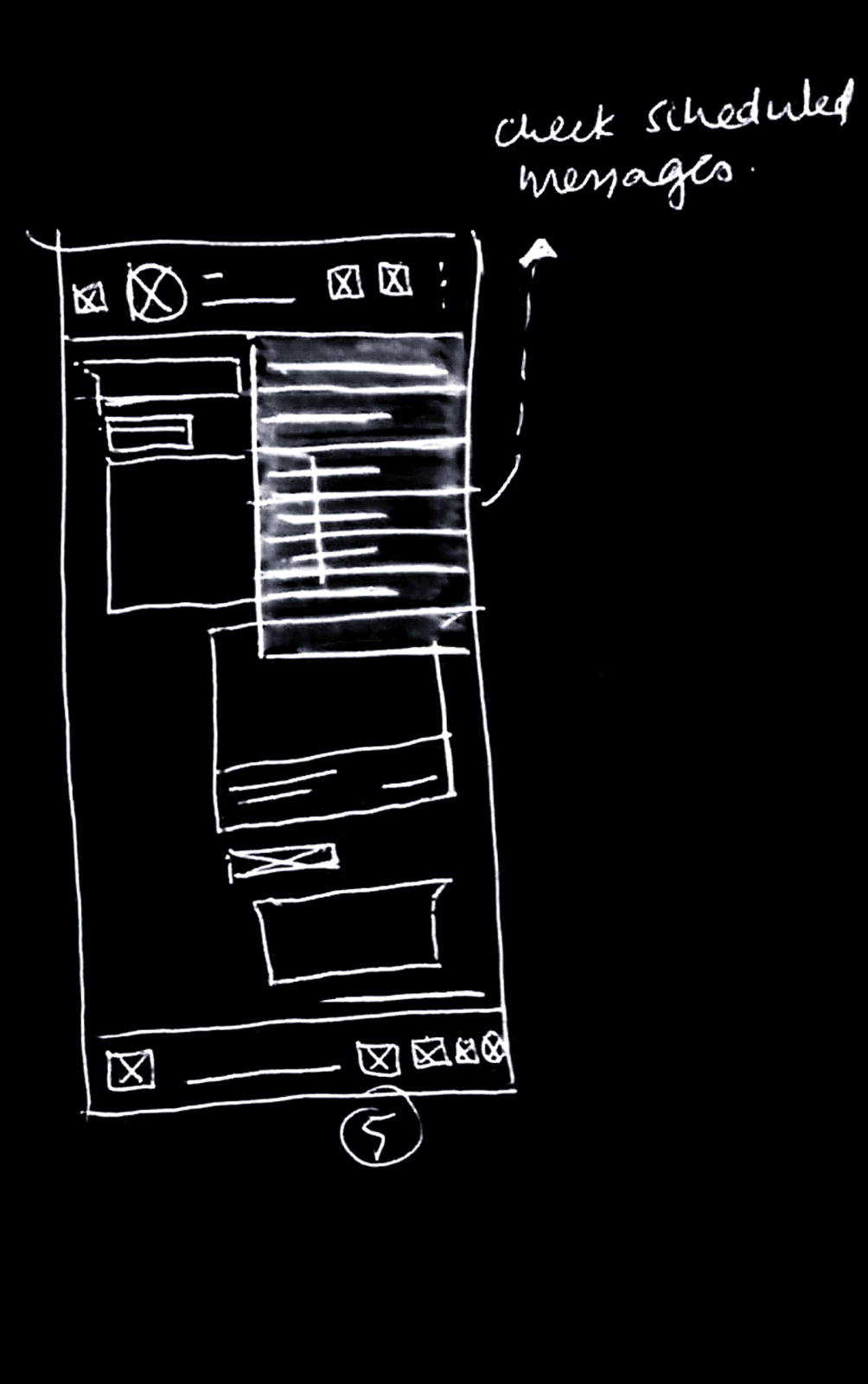
PAPER WIREFRAMES




LO-FI WIREFRAMES


high Fidelity screens
scheduling message flow
THE PROBLEM
THE PROBLEM
/ 01
The Delayed message
A delayed message often miss the moment they matter most.
/ 02
Time zone difference
Messages sent across time zones often reach at the wrong
moment.
/ 03
Forgotten Follow-ups
Important follow-ups get missed when users rely on memory.
/ 01
The Delayed message
A delayed message often miss the moment they matter most.
/ 02
Time zone difference
Messages sent across time zones often reach at the wrong
moment.
/ 03
Forgotten Follow-ups
Important follow-ups get missed when users rely on memory.
GOAL
GOAL
Design a simple and intuitive way to introduce the “Scheduled Send” feature in WhatsApp, enabling users to plan and deliver messages at the right moment. The goal is to ensure the feature feels natural within the existing interface, maintaining clarity, familiarity, and a seamless user experience without adding unnecessary complexity.
Design a simple and intuitive way to introduce the “Scheduled Send” feature in WhatsApp, enabling users to plan and deliver messages at the right moment. The goal is to ensure the feature feels natural within the existing interface, maintaining clarity, familiarity, and a seamless user experience without adding unnecessary complexity.
constraints
constraints
Brand Consistency
Simplicity
Familiarity
Minimal Disruption
Simplicity
Brand Consistency
Familiarity
Minimal Disruption
Brand Consistency
Simplicity
Familiarity
Minimal Disruption
Layout & Spacing Rules
Component Behavior
Color Usage Rules
Iconography & Visual Elements
Layout & Spacing Rules
Typography Rules
design system rules
design system rules
Iconography & Visual Elements
Iconography & Visual Elements
Layout & Spacing Rules
Typography Rules
Color Usage Rules
Component Behavior
Visual Identity System
Visual Identity System
USER FLOW
USER FLOW

PAPER WIREFRAMES
PAPER WIREFRAMES
LO-FI WIREFRAMES
LO-FI WIREFRAMES
HIGH FIDELITY SCREENS
HIGH FIDELITY SCREENS
scheduling message flow
Managing Scheduled messages
Managing Scheduled messages

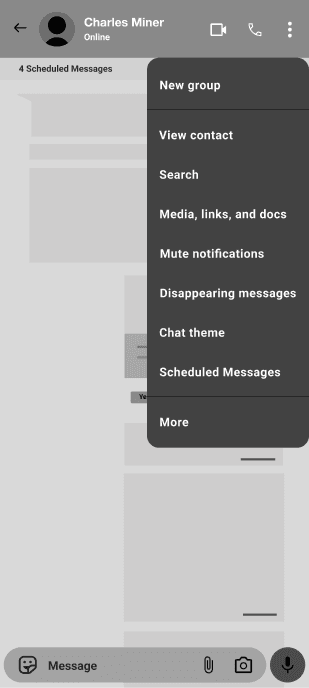
The popup message within the chat acts as a quick access point for scheduled communication. When selected, it redirects users to a dedicated “Scheduled Messages” page where they can view all messages that have been scheduled for that particular conversation. This allows users to easily review, manage, edit, or cancel scheduled messages without interrupting the existing chat experience.
The popup message within the chat acts as a quick access point for scheduled communication. When selected, it redirects users to a dedicated “Scheduled Messages” page where they can view all messages that have been scheduled for that particular conversation. This allows users to easily review, manage, edit, or cancel scheduled messages without interrupting the existing chat experience.
Accessing Scheduled Chats
Accessing Scheduled Chats
All scheduled conversations are organized under a dedicated “Scheduled” category, allowing users to quickly identify chats that contain scheduled messages. This centralized section improves accessibility by grouping scheduled conversations in one place, making it easier to review and manage upcoming messages efficiently.
All scheduled conversations are organized under a dedicated “Scheduled” category, allowing users to quickly identify chats that contain scheduled messages. This centralized section improves accessibility by grouping scheduled conversations in one place, making it easier to review and manage upcoming messages efficiently.
